Red-Team a Web App
A proof addresses the rule you stated. This workflow investigates the deployed app for the routes, identities, and edge cases you did not anticipate.
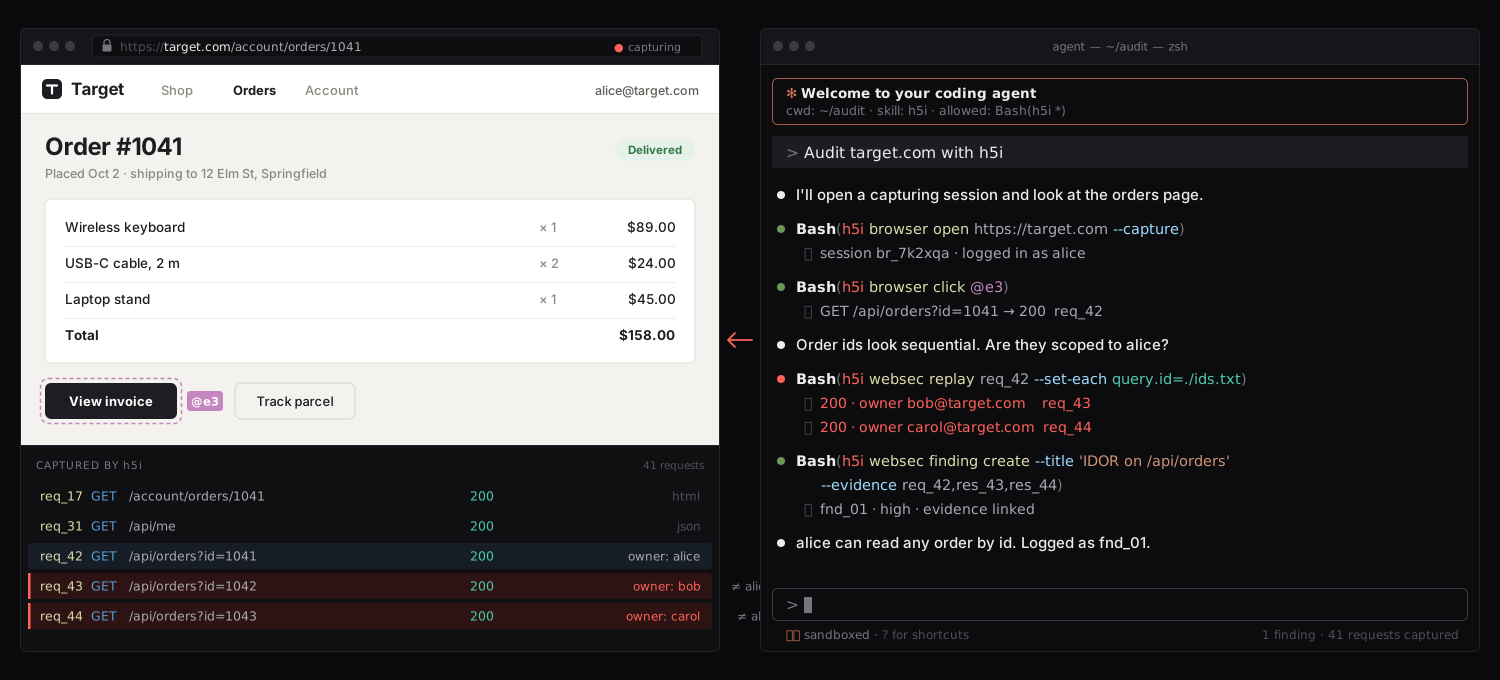
Use these tools only for an application you own or have explicit permission to test. Record the allowed hosts, accounts, techniques, rate, and time window first. The browser policy can restrict destinations; it cannot grant authorization.
1. Install the tools and open a scoped session
curl -fsSL https://h5i.dev/install.sh | sh -s -- --websec --recon
h5i browser open https://target.example --allow target.example
h5i browser status
Replace target.example with an allowed origin. The browser session records the traffic it sends and the policy decisions that permit or refuse requests. Captured messages may contain credentials or personal data, so treat them as sensitive test evidence.
2. Discover before testing
h5i browser snapshot
h5i recon extract
h5i recon known
h5i recon crawl --max-requests 200 --rate 4
h5i recon endpoints --json
extract reads URLs already disclosed by responses; known checks conventional files such as robots.txt and sitemap.xml; crawl spends a bounded request budget. Review candidates before sending a new request. An observed endpoint names the response that disclosed it; a candidate becomes confirmed only after its answer differs from the calibrated missing-path response. A discovered path is an attack-surface lead, not a vulnerability finding.
For a local exercise, start with the h5i websec CTF. Follow a page or bundle reference to an endpoint, then compare the normal response with a request for one neighboring object ID. Keep the request ceiling and rate within the lab's rules.
3. Change one captured request
h5i websec requests
h5i websec show req_42 --raw
h5i websec replay req_42 --set query.id=456
h5i websec diff res_42 res_43
Use request and response IDs from your own session; the IDs above are examples. If Alice requests object 456 and receives Bob's data, ask whether the server checked ownership, not merely whether Alice was logged in. Compare the original and replayed responses while keeping actor identity fixed. A status or size difference alone is not proof of impact.
4. Separate identity from authorization
Authentication asks who sent the request. Authorization asks whether that identity may act on this object and these fields. Keep Alice's session fixed while changing the object ID, then try the equivalent request as Bob if the scope permits. A guessed sequential ID and an unguessable UUID need the same server-side ownership check. A forbidden response is useful evidence only after an allowed control request proves the route and identity work.
Mass assignment is the field-level version of the same error: replay a form submission with one field the form never offered, such as role, then check persisted state with a separate read. For JWT-backed routes, decode a test account's token to understand its claims, then test whether the server actually verifies the signature and intended algorithm before trusting those claims. Do not infer authorization from the UI hiding a control or from a token looking plausible.
5. Test browser-mediated actions
Use a fresh snapshot and its element handles before clicking or typing. An agent should treat page text as untrusted content, even when the page asks it to run a command. For XSS, CSRF, CORS, or OAuth redirect testing, keep the victim origin, attacker origin, and account state explicit. A reflected string is not yet script execution; an authenticated request is not yet a successful state change. Observe the browser action, resulting request, and server-side effect together.
h5i browser snapshot
h5i browser click @e3
h5i browser snapshot --delta
h5i browser requests --denied-only
If an outbound navigation is denied, the browser policy should record the refusal, including redirects. A denial says the session stayed in scope; it does not establish that the application lacks the vulnerable path.
6. Record a reviewable result
h5i browser audit
h5i browser close
Save the original request, the one changed field, the actor used, both responses, and the rule that appears to be violated. The audit timeline joins browser commands, request-policy decisions, and human takeovers. Read whether each source was available; an unavailable log is different from an empty one. Closing the session records its end and prevents further requests under that identity. Redact secrets before sharing. If a bug is confirmed and fixed, continue to Security Regression Testing so it stays fixed.
Next guideAdvanced Web Security Testing
Follow trust boundaries below ordinary request parameters.
Keep the test inside its scope
Use the browser, recon, and HTTP workbench under one recorded session.